
How to Buy Aged Gmail Accounts Safely (Without Getting Banned)
June 12, 2026

Most people who buy their first Gmail account learn the same lesson twice. The first time, they grab the cheapest fresh account, log in from the same browser they use for everything else, change the recovery email on day one, and watch it get suspended by the weekend. The second time, they slow down. They buy the right type, warm it up, and it lasts for years.
This guide is the second version. Whether you need one aged Gmail for a YouTube channel or fifty for a marketplace operation, the rules are the same. Pick the account that matches the job, then treat the first two weeks as fragile.
Fresh, aged, PVA, EDU - what you are actually buying
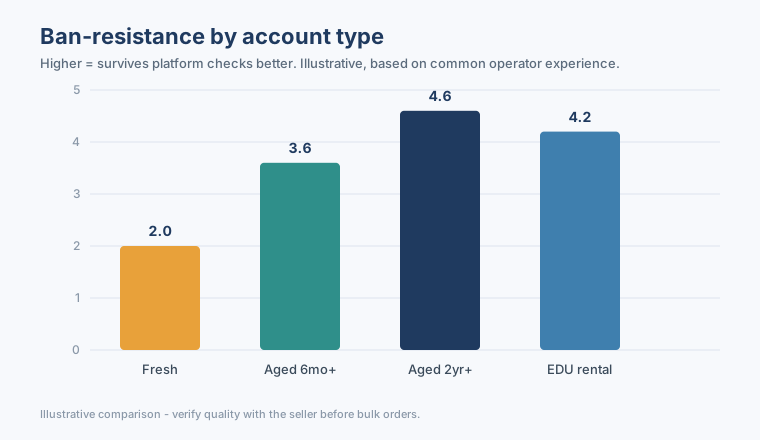
The price differences between accounts are not random. They map to history, verification, and how much a platform trusts the account on day one. Get the category wrong and you either overpay or get banned - both expensive in their own way.
| Type | What it means | Best for |
|---|---|---|
| Fresh | Newly created, almost no history | Testing, low-stakes signups, throwaway flows |
| Aged | Months or years old with activity behind it | Ads, marketplaces, anything that flags new accounts |
| PVA | Phone-verified at creation | Platforms that demand SMS verification on signup |
| EDU rental | Education-domain access, often time-limited | Student discounts, .edu-gated tools, short campaigns |
| Recovery-enabled | Ships with recovery email or phone access | Team handoff, business continuity |
Reference table - confirm exactly what a listing includes before you order in bulk.
One rule cuts through all of it: never default to "aged PVA" for everything. A QA tester burning through signup flows does not need a two-year-old phone-verified account. A Facebook Business Manager does. Match the spend to the risk.
Match the account to the job
Here is what most guides skip: the account type matters less than how well it fits the work you put it through. A few common cases.
E-commerce sellers running multiple Amazon or Etsy shops need a separate aged Gmail per store, ideally country-matched to the marketplace. The fastest way to get every shop linked and banned is logging into five of them from one IP.
Agencies and affiliate marketers juggle client ad accounts, CPA networks, and landing-page tools. Aged accounts clear network approvals; keep a few fresh ones for testing. Reusing one Gmail across competing affiliate programs is a classic way to torch a payout.
SMM and social managers mostly need Gmail as the recovery and registration anchor for Instagram, TikTok, or YouTube. Aged is preferred. Do not chain twenty social accounts to a single recovery inbox - when one falls, they all become discoverable.
| Use case | Recommended type | Why |
|---|---|---|
| Marketplace selling (Amazon/eBay) | Aged PVA, country-matched | New accounts get held; geo mismatch flags fraud |
| YouTube / AdSense | Aged, recovery-enabled | Monetization checks reward account age |
| Ad accounts (Meta/Google) | Aged with clean history | Fresh accounts hit instant spend limits |
| Signup-flow testing | Fresh or lightly aged | Disposable; no reason to overpay |
| .edu tools / student pricing | EDU rental | Access is the product; duration is the variable |
Illustrative guidance - your platform's current rules always win over a table.
The 14-day rule that saves accounts
Buy a clean aged account, then change the password, recovery email, name, and photo on the same afternoon. That single burst of edits is the number-one trigger for an automated suspension review. Two weeks. That is the window where you do almost nothing.
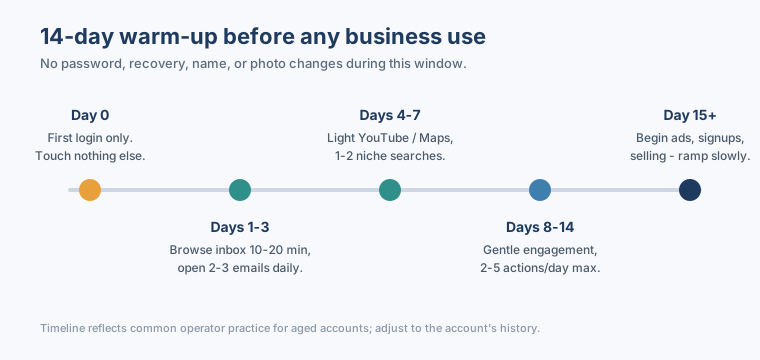
The activity itself is boring on purpose. Days 1 to 3, open the inbox for ten to twenty minutes, read two or three emails, including the Promotions tab. Days 4 to 7, run a couple of niche-related searches and glance at YouTube or Maps if the account history suggests it. Vary the timing - not the same minute every day. From day 15, ramp into ads, selling, or signups slowly rather than all at once.
Managing multiple accounts safely
If you are past three accounts, isolation stops being optional. Platforms link accounts through far more than IP address, so each one needs its own environment.
1. Fingerprint browser
One browser profile per account - separate cookies, canvas fingerprint, timezone, and language. Tools like AdsPower or Multilogin exist for exactly this. Never log into Account A and Account B in the same Chrome window.
2. Residential proxy, country-matched
Each account should operate through a residential IP that matches its registration country. Datacenter IPs trip instant flags on Google and Meta. Keep a static residential IP per aged account; rotating pools are fine for fresh testing accounts as long as the country stays consistent.
3. No profile changes in the first two weeks
Covered above, and it bears repeating because it is the most common self-inflicted ban. No password, recovery, phone, name, or photo changes for 14 days.
4. Daily human-like activity
Ten to twenty minutes a day of normal browsing before any business action. Inbox, a search or two, the occasional video. Real accounts are a little messy and inconsistent - yours should be too.
5. Gentle platform engagement
If the Gmail anchors a social account, keep early engagement light: two to five actions a day in week one, and make comments actually relevant ("Great shot" beats "Nice post check my page"). Follow accounts in the right niche and country, not random mass follows.
6. Scaling rules
| Accounts | Minimum setup |
|---|---|
| 1-3 | Fingerprint browser + one proxy each |
| 4-10 | Dedicated profile + static residential IP each; spreadsheet tracking |
| 10+ | Team SOP for login schedules; no two operators on the same account in the same hour |
Setup minimums scale with account count - thin setups are where bulk operations leak.
Mistakes that get accounts banned in 48 hours
- Buying aged accounts and immediately changing everything.
- Running 50 accounts through one VPN exit node.
- Reusing the same recovery phone across accounts.
- Skipping warm-up and launching ad campaigns on day one.
- Mixing countries - a UK Gmail on a US proxy posting US-targeted content.
None of these are exotic. They are the everyday shortcuts that feel efficient and quietly cost you the account.
Where to buy without gambling on quality
The account is only as good as the supply behind it. What matters is consistent stock, clear listing details (age, verification, recovery), and a guarantee window so a dead-on-arrival account gets replaced instead of argued over.
That is the lane gmailbuy.org sits in - Gmail and Google accounts as the core, plus EDU rentals, Hotmail and Outlook, Twitter, and Instagram stock, each listing labeled with what it actually includes and backed by a short replacement-guarantee window. Treat it as a stock source to compare against, not a reason to skip the warm-up. The buying is the easy part; the two weeks after are what decide whether the account survives.
Buy the type that fits the job, keep your hands off the settings for two weeks, and isolate every account. Do that and the account you bought for a few cents quietly does its job for years.